 Outputs Supported


By default, a new image does not contain an "alt" (alternate text) attribute when you insert it into a topic or snippet, unless you specifically add alt text in the Insert Image dialog. However, alt attributes on images are required for Section 508 compliance, even if the string is empty or null (alt=""). Also, by adding empty alt attributes to images, you can search the files to find the images without alternate text and then add it as needed.
There are a couple of ways to quickly add empty alt tags to images.
[Menu Proxy — Headings — Online — Depth3 ]
How to Apply Empty Alt Text When Output is Generated
- Open a target.
- On the Advanced tab of the Target Editor, select Use empty ALT text for images that do not have ALT text.
- Click
 to save your work.
How to Apply Empty Alt Text When Images are Inserted
- Select File > Options. The Options dialog opens.
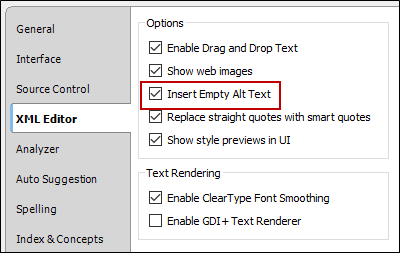
- Select the XML Editor tab.
-
Select the Insert Empty Alt Text check box. A check mark indicates the feature is enabled.
- Click OK.
